
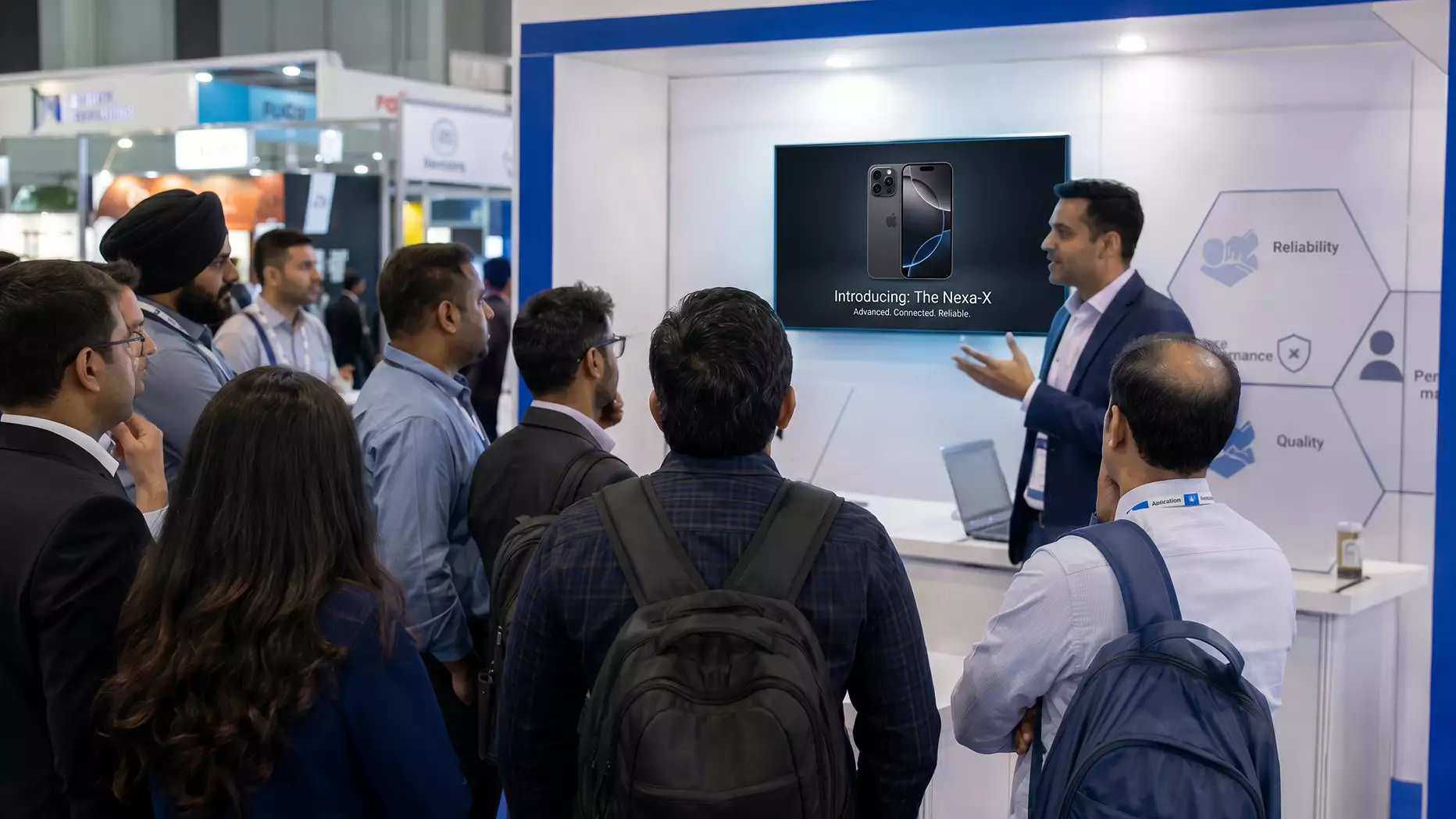
Run an 8–10 minute demo built on one use case. Stage it with a 55-inch+ screen and a wireless headset mic. Schedule fixed start times to draw a crowd. End every demo with a named handoff to a Product Specialist at a nearby table, never with “any questions?” Interactive demos drive 5–12 minutes of dwell time vs 45 seconds for passive displays.
A live product demo is the single moment on an exhibition stand where a passing visitor either becomes a lead or keeps walking. It is also one of the most underprepared parts of most exhibitor plans. Brands invest heavily in the stand build, the graphics, and the giveaway, then ask a product manager to “just talk through the software for ten minutes” on the day. The result is a demo that visitors politely watch for thirty seconds before drifting off.
The stakes are higher than that treatment suggests. Trade show attendees have buying authority, meaning that more than four in five people walking past your stand are potential customers, not browsers. The same body of research found that 75% of exhibitors want to improve their visitor engagement strategy, a sign that most stands already know their current demo approach is leaving leads on the table.
Let’s see how you can run a live product demo on an exhibition stand the right way: the script structure, the physical staging, and the audience management techniques that hold a crowd long enough to convert.
What a Live Product Demo Actually Is (and Isn’t)
A live product demo on an exhibition stand is a short, repeatable, in-person presentation where a Demo Presenter or Product Specialist shows a product in action to a small standing audience, usually for between five and twelve minutes. At its best, it is an exercise in storytelling, taking a visitor from a problem they recognise to a solution they can see working, and it remains one of the most reliable tools to engage audience members at a trade show. It is not a sales pitch, a webinar, or a stage keynote.
The format earns its space on the stand because of what it does to dwell time. EXHIBITOR Magazine reports average dwell times of 5 to 12 minutes at interactive booths, compared to roughly 45 seconds at passive displays. That gap, between someone glancing and someone genuinely engaging, is what a live demo is designed to create.
The format has three jobs:
- Stop people walking past the stand.
- Show one clear use case end-to-end.
- Move interested viewers into a one-to-one conversation with a sales contact.
If your demo is trying to do more than that, it will fail at all three.
The Demo Script: A Five-Part Structure That Works on a Show Floor
Most exhibition demos fail because the presenter starts with company history. Show floors do not reward context. They reward immediate relevance. A demo script for a trade show needs a different shape from a boardroom presentation. The structure below has held up across hundreds of stands at UK exhibitions and gives you a repeatable template you can adapt to any product.
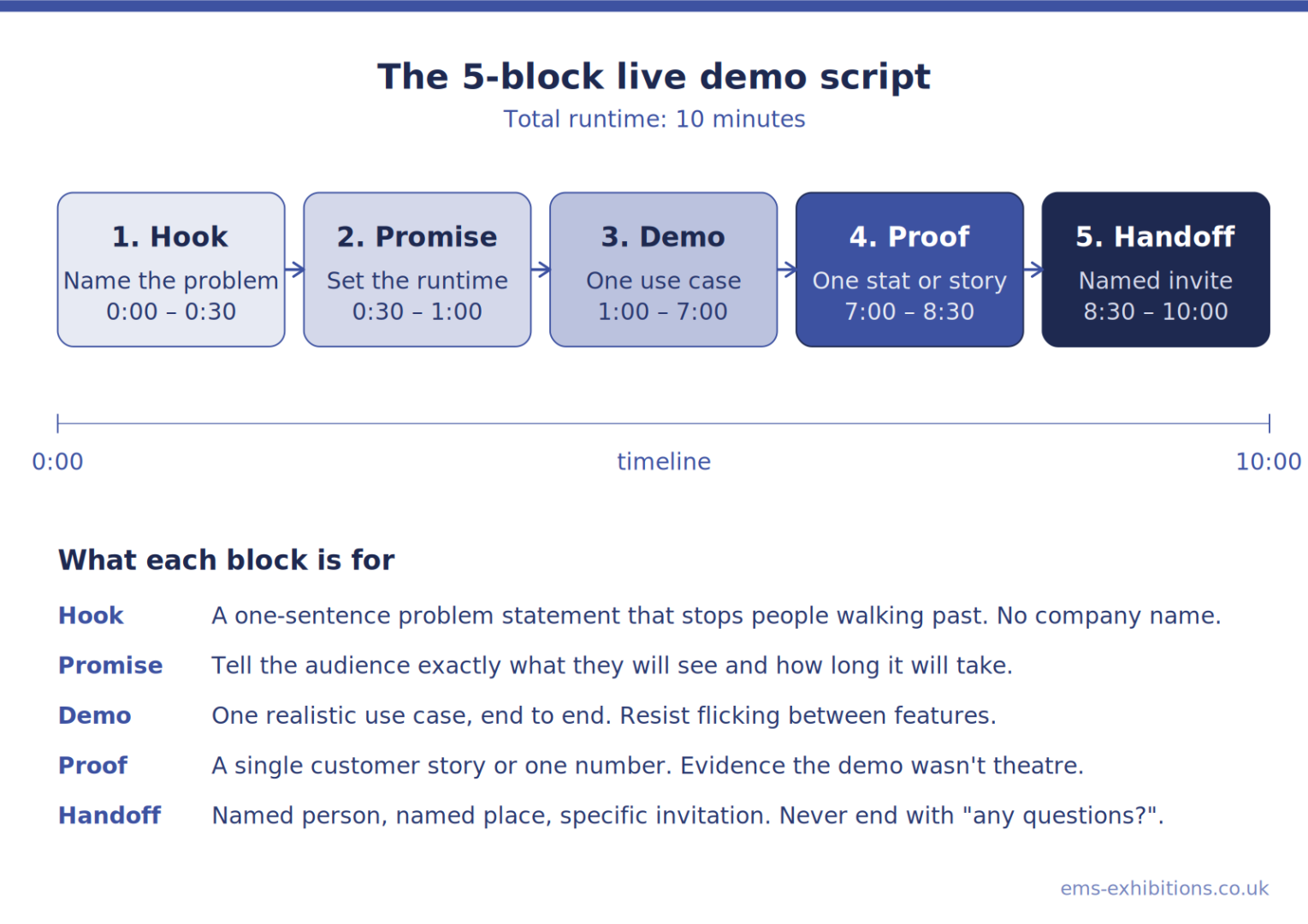
1. The Hook (0:00 – 0:30)
Open with a problem the audience already knows they have. One sentence. No company name yet, no logo on screen, no “thanks for stopping by”. Something like: If your team is still chasing approvals over email, the next ten minutes will save you four hours a week.
The hook has to do its work fast. EXHIBITOR Magazine puts the window at 3 to 5 seconds, the time a passing attendee gives a stand before committing to the next one. That is why the opening line cannot afford a preamble. If the first sentence does not name a problem the listener recognises, they are gone before sentence two.
2. The Promise (0:30 – 1:00)
Tell them exactly what they are about to see and how long it will take. “I’m going to show you three things in eight minutes: how the dashboard flags blockers, how approvals route automatically, and how it integrates with your existing CRM.” People stay when they know the runtime. They drift when they do not.
3. The Demonstration (1:00 – 7:00)
Show the product doing the work. One scenario, end-to-end. Resist the temptation to flick between features. A single use case, fully completed, beats a tour of twelve menus every time. This is where most exhibition demo scripts go wrong: the presenter knows the product too well and zigzags. Pick one realistic scenario, run it cleanly, and stop.
4. The Proof (7:00 – 8:30)
One short customer story or one number. “A logistics firm in Birmingham cut its approval cycle from nine days to two using exactly this workflow.” You are not reading a case study. You are dropping a single piece of evidence that the demo wasn’t theatre.
5. The Handoff (8:30 – 10:00)
This is the part exhibitors forget. A live product demo at a trade show is worthless if it does not end in a clear next step. End with a question, not a thank you. “Who here is currently using something like this? I’d love to show you how it would fit with your stack. Let’s grab two minutes at the table behind me.” Then physically gesture to a waiting team member. Demos that end with “any questions?” lose half their warm leads to the next stand.
Building Your Own Demo Script Template
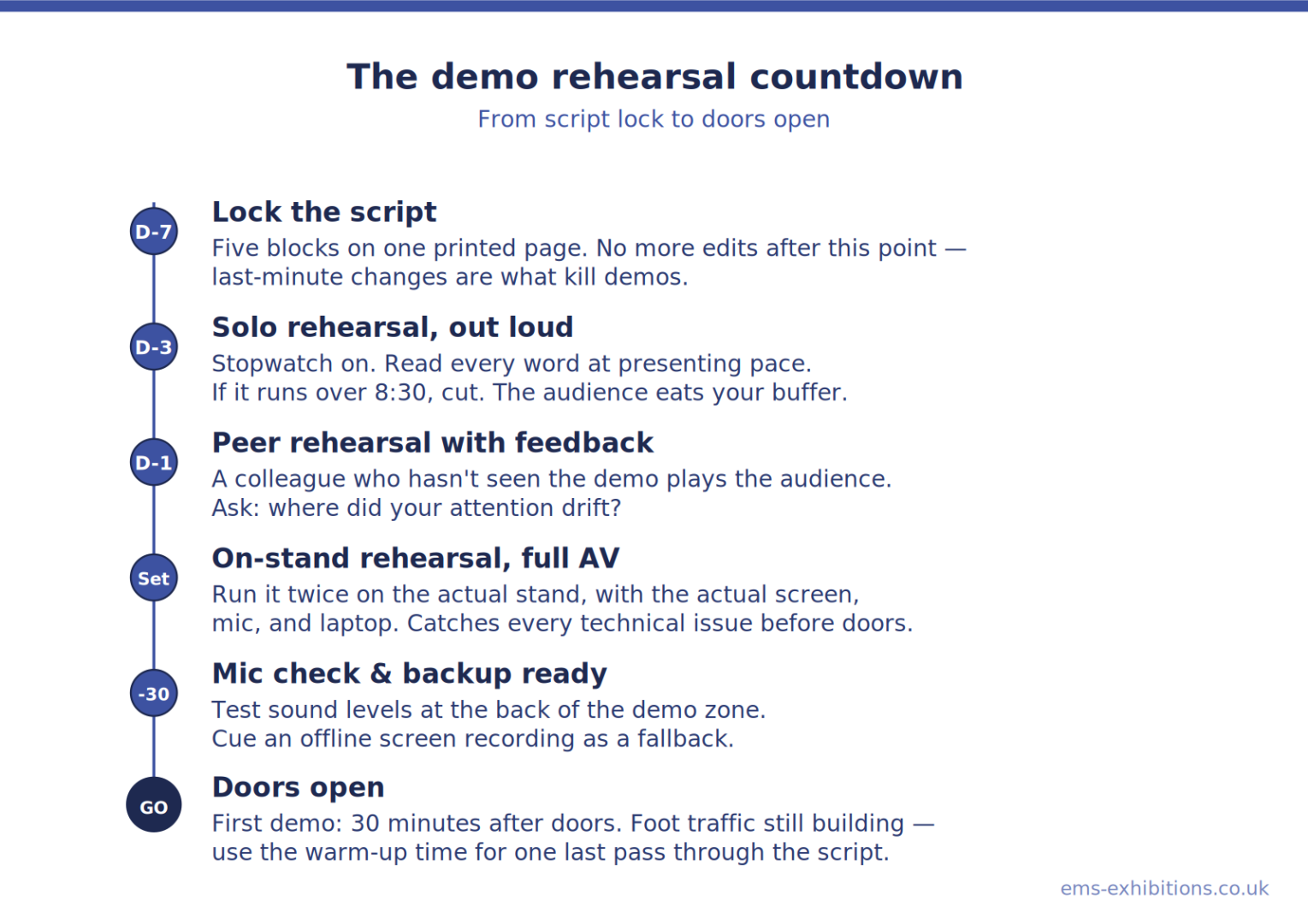
Write the script as five timed blocks on a single page. Print it. Rehearse against a stopwatch. Aim for ninety seconds shorter than the time you have, because real audiences slow you down with reactions and questions. If you cannot deliver the demo in the time slot without skipping, the script is too long, not that the audience is too slow.
This five-block format is the backbone of most usable exhibition demo script templates that UK exhibitors rely on, and the live demonstration best practices exhibitors quietly share between shows almost always come back to the same principle: rehearse the live demonstration script for exhibitions out loud, on the actual stand, with the actual AV, before the doors open.
Demo Staging: Designing the Physical Setup
The script is half the job. The other half is the physical staging, where the presenter stands, where the audience stands, what they see, and what they hear. This is where most exhibition demos quietly fail before the first word is spoken.
- Sightlines and Screen Choice
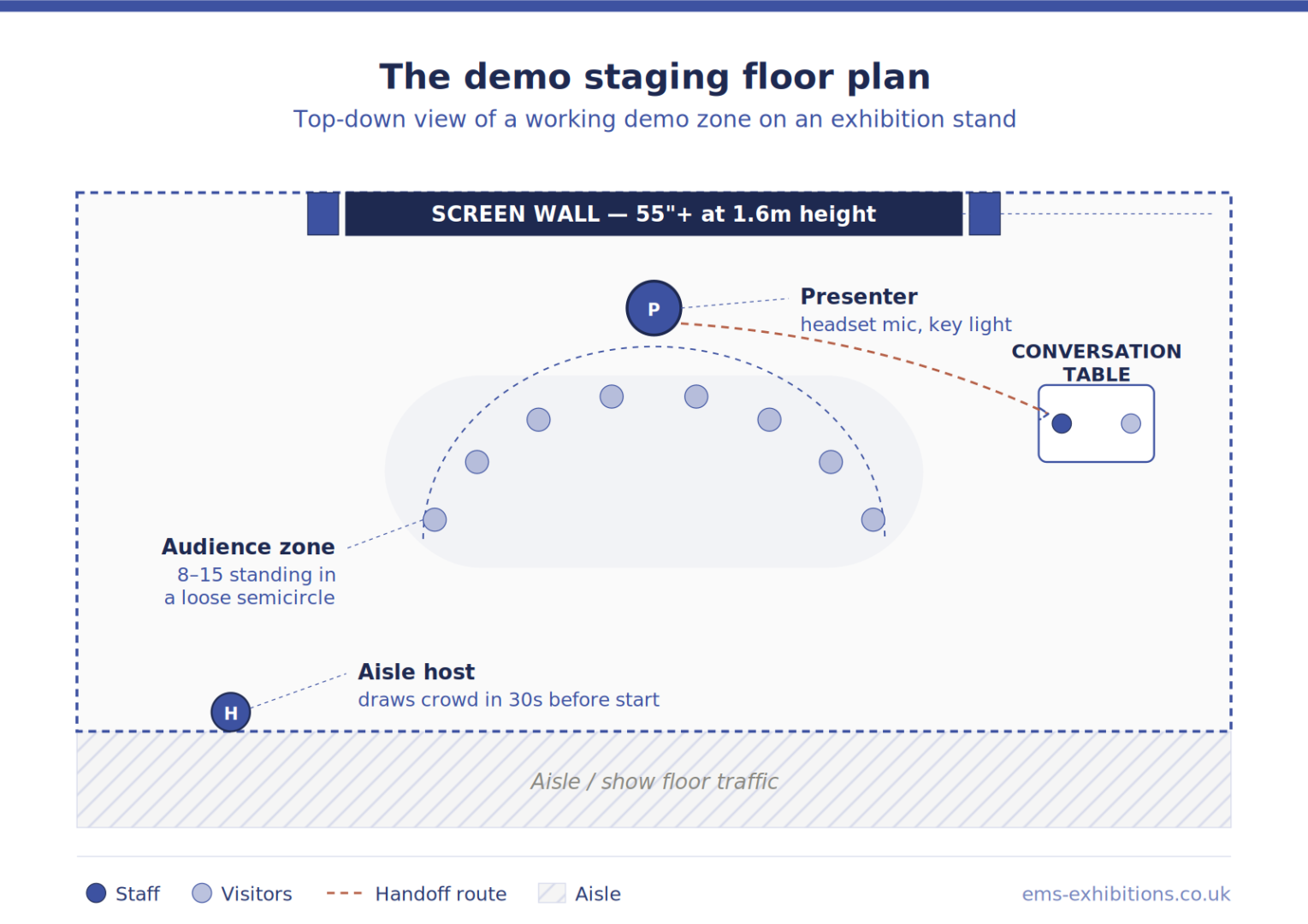
A laptop screen turned toward the aisle is not a demo. Anyone more than two metres back cannot read it. For a stand running scheduled demos, the realistic minimum is a 55-inch screen mounted at eye level for a standing audience, which sits roughly 1.6 metres off the floor. For larger crowds of twenty or more people, common at major launches at ExCeL London, a 75-inch screen or a small LED video wall keeps the back row engaged. Detailed planning around screen size, mounting height, and viewing angles is something a specialist exhibition audio visual hire supplier handles routinely as part of a pre-event site survey.
- Sound: The Most Underestimated Variable
Show floors are loud. ExCeL on a busy day sits around 75 to 80 decibels of ambient noise. A presenter speaking unamplified will not be heard past the front row. A small PA system with a single wireless headset microphone solves this and costs less than most exhibitors expect. A wired handheld mic is a poor second choice because it pins the presenter’s hand and breaks the demo flow when they need to point at the screen.
The cleanest setup for a demo zone is: one headset mic on the presenter, one or two compact powered speakers angled inward toward the demo audience (not outward into the aisle, which annoys neighbouring stands and triggers complaints from venue management), and a simple mixer that the presenter does not need to touch.
- The Demo Floor: Where People Stand
Mark the demo audience area visually. A different carpet colour, a low rope, a light change overhead, anything that signals this is the spot. People are reluctant to be the first to stop at a stand. A defined audience zone gives them permission. A loose semicircle holds attention better than rows; viewers can see each other reacting, which builds social proof.
Keep the presenter’s position clear of stand traffic. If your booth has a coffee point or a giveaway desk, put them at the opposite end. Nothing kills a demo faster than the smell of fresh espresso pulling half the audience away at minute four.
- Lighting
Stand lighting is usually designed for graphics and overall mood, not for a presenter’s face. A single small key light on the demo position, even a clip-on LED panel, makes the presenter look sharper, more confident, and more watchable on any video the social team captures. It also signals to passing visitors that something is happening here.
For a fuller view of how seating, counters, demo plinths, and AV furniture work together inside a stand layout, the exhibition stand furniture guide is a useful companion reference.
Audience Management: Drawing, Holding, and Closing the Crowd
Even a perfect script and a perfect setup fail if no one stops. Audience management at a trade show is its own skill, and it has three phases.
Drawing a Crowd
The fastest way to attract a crowd at an exhibition demo is to already have one. A stand with three people watching pulls a fourth, who pulls a fifth. Solving the cold start matters more than any other audience tactic.
Three things that work:
- A scheduled demo board at the front of the stand listing exact start times. “Live demo: 11:00, 12:00, 13:00, 14:00, 15:00.” Specificity creates appointments. Vague signage (“demos all day”) creates nothing.
- A stand host who is not the presenter works the aisle thirty seconds before each demo, inviting people in based on their name badge. It is not a sales pitch, just a simple line: ‘We’re starting in thirty seconds, you’ll like this one if you work in [their job role].’
- A visible countdown on the demo screen in the two minutes before the start time. Movement on a screen is readable from twenty metres away.
Holding the Crowd
Once the demo starts, the first ninety seconds are the only ninety seconds that matter. If a viewer is still there at minute two, they will usually stay to the end. Hold tactics:
- Name the elephant. If the product is complex, say so early: “This looks like a lot. I’ll only show you the part that matters today.” Honesty buys patience.
- Ask one show-of-hands question. “Who here has lost a lead because the handover was slow?” Three hands going up turns spectators into participants.
- Never apologise for the demo. No “sorry, the Wi-Fi’s a bit slow” or “this normally works”. Visitors interpret apologies as warnings to leave.
Closing the Crowd
The end of the demo is a transition, not a conclusion. The presenter’s job at the close is to physically move warm viewers off the demo floor and into the conversation zone. This is why staging matters; the conversation zone needs to be visible, adjacent, and obviously staffed. That apparatus is simple: a small high table with two stools, a Product Specialist already standing at it, and a tablet for capturing details.
The split of roles is not arbitrary. CEIR’s 2024 visitor engagement research found that 83% of attendees prefer engaging with sales and marketing staff. The two groups do different jobs in a buyer’s journey, and visitors notice when the same person is trying to do both. Separating the Demo Presenter from the Product Specialist at the handoff isn’t a formality; it’s matching the right role to the moment.
The handoff line is always the same shape: one specific invitation, one named place, one named person. “Sarah is at the table to my left for the next ten minutes; she can show you how this would work with your CRM specifically.” Unclear invitations (“come and chat any time”) convert at a fraction of the rate.
Demo Timing: How Often, How Long, How Many People
A practical pattern that works at most UK trade shows:
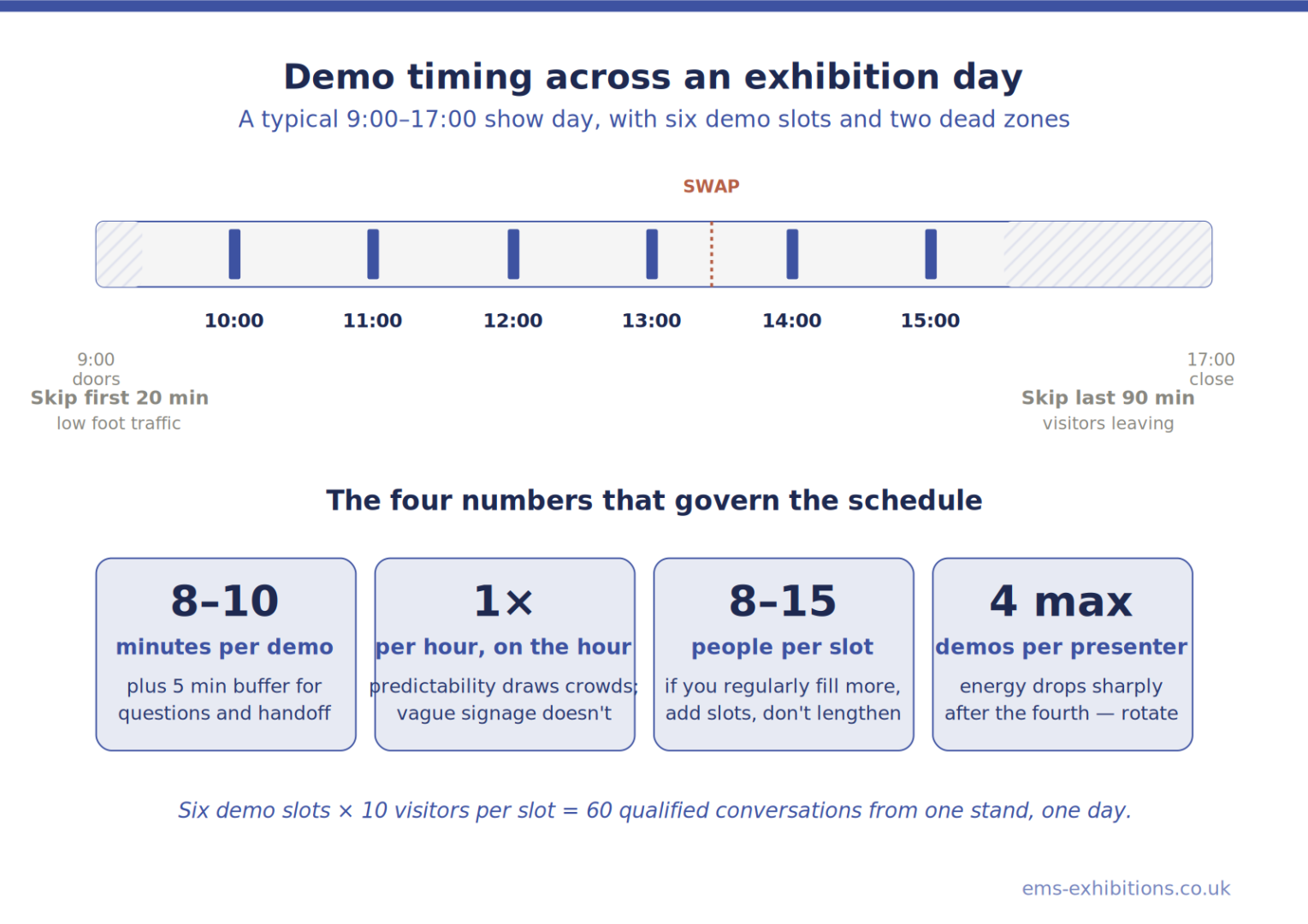
- Demo length: 8–10 minutes of presentation, plus 5 minutes of buffer for questions and handoff.
- Frequency: Once per hour, on the hour, with the first demo no earlier than thirty minutes after doors open and the last demo no later than ninety minutes before doors close.
- Presenter rotation: No presenter does more than four demos in a row. Energy drops sharply after the fourth, and visitors can tell.
- Audience size: Plan staging for 8–15 people standing. If you regularly get more, the demo is working, and you should add a second daily slot, not lengthen the existing ones.
Avoid demos during the first twenty minutes and the last ninety minutes of each show day. Foot traffic is too low for the early slot and too distracted for the late slot.
Common Mistakes to Avoid
A few patterns that derail otherwise good exhibition demos:
- Reading from slides: If your demo is a slide deck with a product screenshot, it is not a demo. Show the product itself.
- Letting the demo become a sales call mid-flow: A keen prospect in the front row asks a detailed pricing question at minute three. The presenter answers for two minutes. The other twelve people leave. Defer detailed questions to the handoff: “Great question, let’s cover that at the table after.”
- Skipping the rehearsal: A demo script that has not been delivered out loud, against a stopwatch, in front of a colleague, is not ready. Rehearse twice on the day of setup, on the actual stand, with the actual AV.
- No backup: Internet fails. Software updates push. Have an offline screen recording of the same demo cued up as a fallback. Visitors do not need to know it is a recording if the live version dies.
- One person doing everything: A presenter cannot work the aisle, capture leads, and reset the demo. A working stand needs at a minimum one Demo Presenter, one stand host, and one closer at the conversation table for each active demo slot.
The pattern across all of these mistakes is the same. The strongest exhibition booth presentation tips and trade show product presentation tips for UK exhibitors all come back to a single principle: the demo is a designed experience, not an extended chat. Treat it that way, and it earns its slot on the floor.
Bringing It Together
A successful live product demo on an exhibition stand is the product of three things working at once: a script tight enough to deliver in eight minutes without skipping, a staging setup where every person in the audience can see and hear clearly, and a deliberate audience management plan that draws people in, holds them through the first ninety seconds, and physically moves them into a sales conversation at the end.
The thread tying all three layers together is visitor engagement: every choice in the script, the staging, and the audience plan should be tested against the question of whether it makes the visitor lean in or look away.
The payoff for getting it right is measurable. CEIR research has found that interactive booth elements capture 33–45% more qualified leads than passive setups, and the Freeman Trends Report shows interactive technology delivers a 3–5x engagement lift. A live demo is the most accessible, lowest-cost form of interactivity most exhibitors can run.
The brands that consistently win at UK trade shows as Ems Exhibitions, whether at ExCeL London, Olympia, the NEC, or Manchester Central, are not the ones with the loudest stands. They are the ones who treat the demo as a designed experience, rehearse it like a live performance, and invest in the AV and staging that lets the work actually be seen and heard. Get those three layers right, and a single demo slot can produce more qualified pipeline than the rest of the stand combined.
FAQs
How long should a live product demo at a trade show be?
Eight to ten minutes of presentation, plus around five minutes of buffer for questions and the handoff to a sales contact. Anything shorter rarely shows enough of the product to build trust; anything longer loses the standing audience. If you can’t deliver your demo in that window without skipping, the script is too long, not the audience too impatient.
How do you attract a crowd to an exhibition demo?
Three things move the needle: a scheduled demo board at the front of the stand listing exact start times (e.g., “Live demo: 11:00, 12:00, 13:00”), a stand host working the aisle in the thirty seconds before each demo to invite people in, and a visible countdown on the demo screen in the final two minutes. Specificity creates appointments. “Demos all day” creates nothing.
What AV equipment do you need for an exhibition product demo?
At a minimum: a 55-inch screen mounted at standing eye level (around 1.6m off the floor), a wireless headset microphone for the presenter, one or two compact powered speakers angled inward toward the audience, and a small mixer pre-set so the presenter never has to touch it. For larger crowds, twenty or more, step up to a 75-inch screen or a small LED video wall.
How do you end a product demo at a trade show?
End with a named handoff, not a thank you. The format that works: one specific invitation, one named place, one named person. For example: “Sarah is at the table to my left for the next ten minutes; she can show you how this would work with your CRM specifically.” Closing with “any questions?” loses most of the warm leads to the next.
What are good interactive demo ideas for exhibitions?
The strongest interactive formats are the simplest: a hands-on station where visitors operate the product themselves while a Product Specialist guides them, a “before and after” comparison with the visitor’s own data (a website, a sample dataset, a sample workflow), or a short challenge with a clear outcome, for example, “complete this task in our system in under a minute.” Heavy AR/VR setups draw photos but rarely produce qualified conversations unless tied to a specific use case.
How many people should staff a demo on an exhibition stand?
A working demo slot needs three people minimum: a Demo Presenter delivering the script, a stand host drawing people in from the aisle and managing the audience zone, and a Product Specialist or sales contact at a conversation table for the post-demo handoff. One person trying to present, attract, and close at once will do all three poorly.
How often should you run live demos during an exhibition day?
Once an hour, on the hour, is the pattern that works at most UK trade shows. Skip the first twenty minutes (foot traffic too low) and the last ninety minutes (visitors are tired and heading out). Rotate presenters so no one delivers more than four demos in a row, because energy drops sharply after the fourth, and audiences can tell.